

I’ve been using Kraken exchange for about five years now.
Not just to try it. Not just during bull markets. I’ve used it continuously, with a personal account and later with a corporate account tied to validator activity.
This article isn’t a standard “Kraken review” with scores and comparison tables. It’s a long-term return of experience. What it feels like to use Kraken exchange in practice.
How it behaves when you move real funds. How it handles compliance. What works well. What’s slightly annoying. And where the trade-offs are.
I’ll talk about Kraken Pro, spot trading, selling staking rewards like DOT or SOL, using iceberg orders for larger validator-related operations, withdrawals to a bank account, the OTC desk, fees compared to Binance, and even how support handled a regulatory update.
In short, this is what five years on Kraken actually looked like.
Why I Initially Chose Kraken
When I opened my account, I wasn’t optimizing for the lowest fees.
I was looking for durability.
Kraken has been around since 2011. In crypto, that matters. It survived multiple market cycles, major exchange collapses, regulatory waves and industry scandals. That kind of track record carries weight.
It didn’t feel flashy. It felt structured.
At the time, that was enough for me.
Personal Account vs Professional Account
On the personal side, my usage has been fairly simple.
Mostly acquiring Bitcoin, Ethereum or other tokens. Occasionally selling and withdrawing to a bank account. No complex trading strategies. No leverage.
The corporate account, linked to validator operations, changed the scale a bit.
The difference wasn’t so much the type of actions. It was the frequency and sometimes the size of the transactions.
On the professional side, I was regularly selling staking rewards — DOT, SOL, Kusama, Mina and similar assets. Most of the time, those were sold into EUR or USD. Sometimes into BTC when I wanted to build or maintain a treasury position directly in Bitcoin.
The onboarding for the business account was more demanding, which is expected. More documents. More verification. But once validated, the day-to-day experience was very similar to the personal account.
Kraken Pro Review: Why I Mostly Use the Advanced Interface
Kraken offers a basic interface and Kraken Pro.
The simple interface is clean and functional. If someone just wants to buy crypto and hold it, it’s perfectly fine.
I rarely use it.
Most of the time, I’m on Kraken Pro. Even for simple spot trades.
Why? Because I like seeing the order book. I like seeing liquidity. I like understanding where my order sits relative to market depth.
Kraken Pro is more technical, but it’s not chaotic. You have the chart, the order book, recent trades, open orders, balances. Everything is visible.
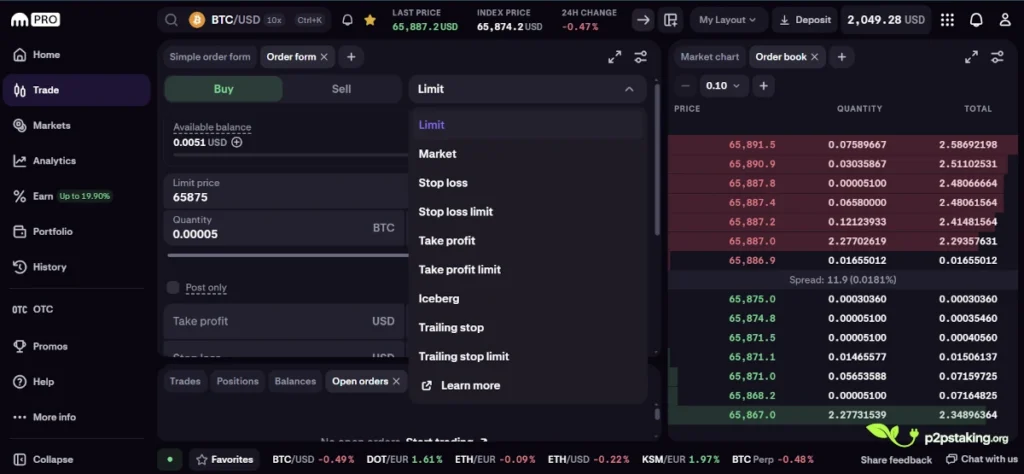
On a small laptop screen, it can feel tight. There’s a lot of information competing for space. On a proper monitor, it feels much more comfortable.
For anyone searching specifically for a Kraken Pro review: it’s not the prettiest interface on the market, but it’s functional, dense and serious. If you care about execution quality rather than design aesthetics, it does the job.
Kraken vs Kraken Pro: Not Just a Different Layout
One thing that’s important to understand is that Kraken and Kraken Pro are not just two visual themes of the same interface.
They’re two different environments with partially different feature sets.
It’s not only about design. It’s also about how you access certain functionalities — and sometimes whether you can access them at all.
A simple example is DCA.
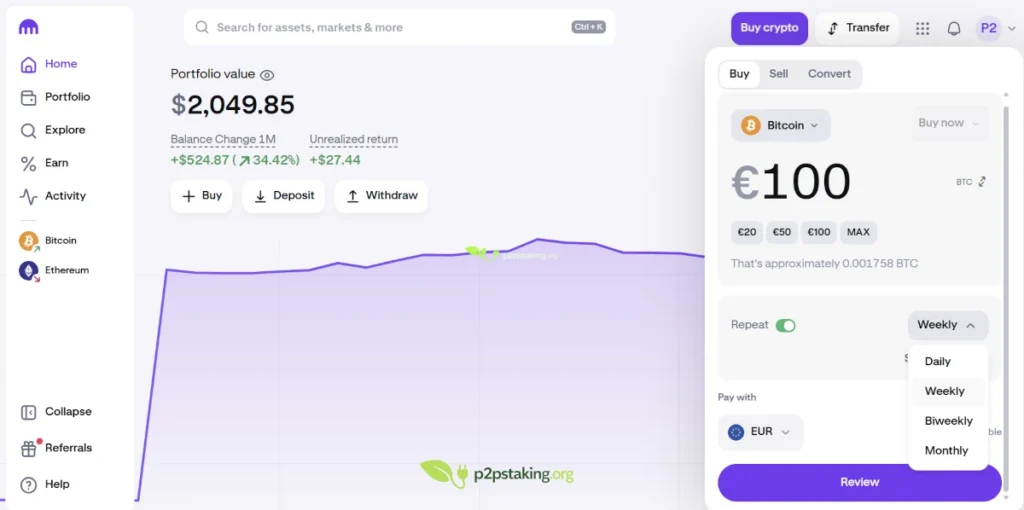
On the basic Kraken interface, you can set up recurring buys. You can automate purchases directly from your euro, dollar or USDC balance. You can also connect a payment method, like a bank transfer or card, and schedule regular purchases that way.
That feature simply does not appear inside Kraken Pro.
So if you only ever use Kraken Pro, you might think Kraken doesn’t offer DCA at all… In reality it’s available, just on the standard interface.
The opposite is also true.
Kraken Pro gives access to advanced trading tools that don’t exist on the basic interface. Iceberg orders, more complex order types, deeper order book visibility.
These are clearly designed for users who want more control over execution.
So switching between Kraken and Kraken Pro isn’t just a cosmetic choice. It’s sometimes necessary depending on what you want to do.
If you want automated recurring accumulation, you go to the basic interface.
If you want precise execution and advanced order management, you move to Kraken Pro.
Understanding that distinction avoids confusion and makes the overall experience much smoother.
Selling Staking Rewards: How It Actually Works
Most of the time, selling staking rewards is straightforward.
Rewards arrive gradually. They’re not huge blocks dumped at once. So I typically use simple spot limit orders.
For example, selling DOT, SOL or Kusama against EUR or USD. Sometimes against BTC if I want direct Bitcoin exposure.
On liquid pairs, execution is smooth. There’s enough depth. You place the order, you wait, it fills.
There’s nothing complicated about it.
When Iceberg Orders Become Useful
The need for something more advanced appears when dealing with validator-level amounts.
At launch, you might need to accumulate a significant self-stake position. When stopping operations, you might need to unwind a large allocation.
In those situations, placing one big visible order can move the market, especially on mid-cap or lower-cap assets.
That’s where iceberg orders on Kraken Pro are useful.
Instead of displaying the full size, you expose only a fraction of the order in the book. As each visible portion fills, another portion appears.
In practice, this allows you to position significant buy or sell orders without creating visible disorder in the order book and without impacting price more than necessary.
Iceberg is not a full TWAP execution algorithm, but in practice it achieves a similar goal: reducing market impact by avoiding the sudden appearance of a large visible order.
For the volumes I handled, this feature was genuinely practical. It gave flexibility without needing external execution services.
Kraken OTC
Kraken also offers an OTC desk, accessible starting around €50,000 or the equivalent in USD.
It’s a more personalized service. You work with a dedicated desk to execute larger trades without going through the public order book.
Now, just because it starts at €50,000 doesn’t mean it’s always relevant at that level.
On highly liquid markets like Bitcoin or Ethereum, you can often execute significantly larger sizes directly on spot using limit or iceberg orders without meaningful slippage.
On lower liquidity or smaller capitalization assets, though, €50,000 can already be market-moving. In those cases, the OTC desk can make sense much earlier.
One thing worth noting is that Kraken’s OTC access threshold is relatively accessible compared to some exchanges where minimums are far higher. And it’s available across a broad range of assets.
For lower-cap tokens, that flexibility is actually a strong differentiator.
Deposits, Confirmations and Withdrawals
Crypto deposits have been consistent.
Once the transaction is on-chain, you can see the confirmation progress directly. Kraken shows how many confirmations have been reached and how many are required before funds become fully usable.
That visibility matters. You’re not guessing. You see the progression. You know when the balance will be available for trading.
I haven’t experienced unexplained delays beyond what the blockchain itself would justify.
Bank withdrawals have been one of the strongest points in my experience.
Often, funds arrive within ten minutes. Not always, but very frequently. Occasionally it takes longer, sometimes up to a day, but overall the process has been reliable and predictable.
When you operate regularly, that predictability reduces stress. You don’t second-guess whether the transfer will show up.
binance and Kraken Fees Comparison
Fees are one of the areas where Kraken requires a bit of attention — especially depending on which interface you use.
If you’re on the basic Kraken interface and you buy crypto directly with a card or a small bank transfer, the fees can be surprisingly high. On small amounts, you can see payment processing fees close to 3%. On top of that, there is often an additional trading fee of around 1%.
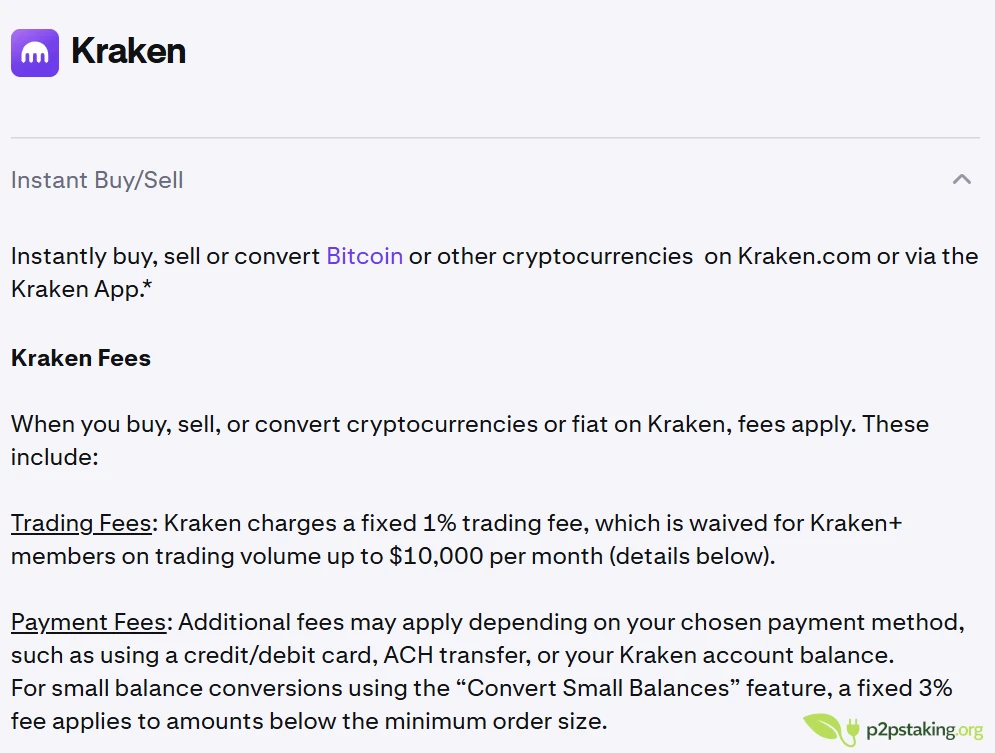
If you’re new to crypto and you’re making an occasional purchase, you might not even notice it. For a beginner buying once in a while, that simplicity can justify the cost.
But if you plan to use Kraken regularly, that route is simply too expensive. Over time, those percentages add up quickly.
That’s why, in practice, serious users move to Kraken Pro.
On Kraken Pro, the fee structure is volume-based. The more you trade, the lower your fees become. Compared to many exchanges, Kraken can actually be competitive depending on your monthly volume tier.
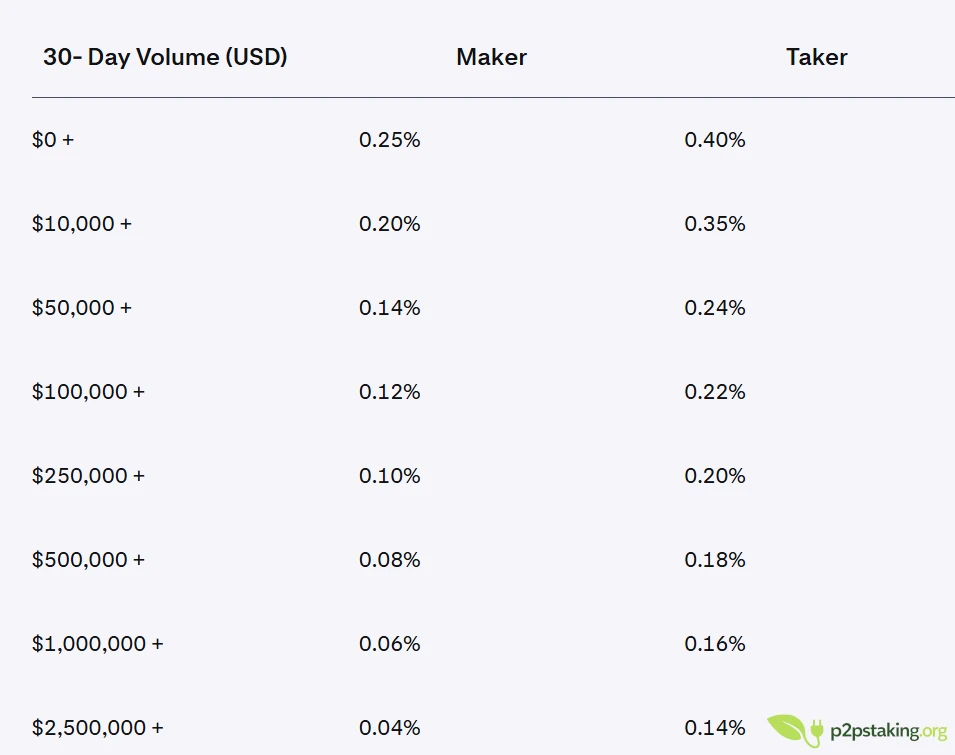
However, if you compare it directly to Binance — which remains the benchmark for ultra-low trading fees — Kraken’s taker fees will generally be higher.
It doesn’t mean Kraken is overpriced. It just means it’s not positioned as the absolute cheapest execution venue in the industry.
For high-frequency traders optimizing every basis point, Binance will usually win on fees.
For users like me, who value execution stability, regulatory clarity and operational reliability, Kraken’s fees are acceptable — especially when using Kraken Pro correctly and avoiding the high-cost basic purchase flow.
The key is simple: if you use Kraken, use it properly. Avoid small instant card buys when possible, fund your account efficiently, and trade through Kraken Pro.
That makes a significant difference.
Support, Verification Levels and What You See on Trustpilot
If you read Trustpilot reviews 1, you’ll see recurring complaints about frozen withdrawals or blocked accounts.
In many cases, the first issue isn’t compliance investigations. It’s verification level.
Kraken, like most regulated exchanges, has different account tiers. Each tier allows different deposit and withdrawal limits. If someone tries to move significant funds without having completed the appropriate verification level, restrictions can apply.
That’s the first thing to check.
Beyond that, there are additional compliance reviews when regulations change. I experienced that during a MiCA-related update in the EU. My account required additional documentation even though it had been verified years earlier.
For a short period, it was partially restricted. I contacted support via chat and requested clarification. I was called back, the situation was explained clearly, and the issue was resolved within one or two days.
It wasn’t pleasant, but it wasn’t arbitrary either.
After Five Years
After five years, across personal and professional usage, Kraken remains a platform I consider solid.
It’s not built around extreme leverage. It’s not the cheapest. It’s not aggressively marketed.
But it feels mature.
It’s one of the few exchanges where I’m comfortable leaving moderate funds for medium-term operational needs. That’s not something I say lightly in crypto.
On post platforms, I avoid that entirely.
For my profile, somewhere between long-term investor and operational validator, Kraken has offered a balance that worked.
That’s my experience.

Java‑certified engineer and P2PStaking CEO, I secure validators across Solana, Polkadot, Kusama, Mina, and Near. My articles reflect hands‑on wallet ops and real recovery drills so you can set up self‑custody safely, step by step.
Ready to Take Control of Your Crypto?
Go deeper into self‑custody, software wallets, hardware wallets, and practical guides.
Footnotes
1: https://www.trustpilot.com/review/kraken.com
