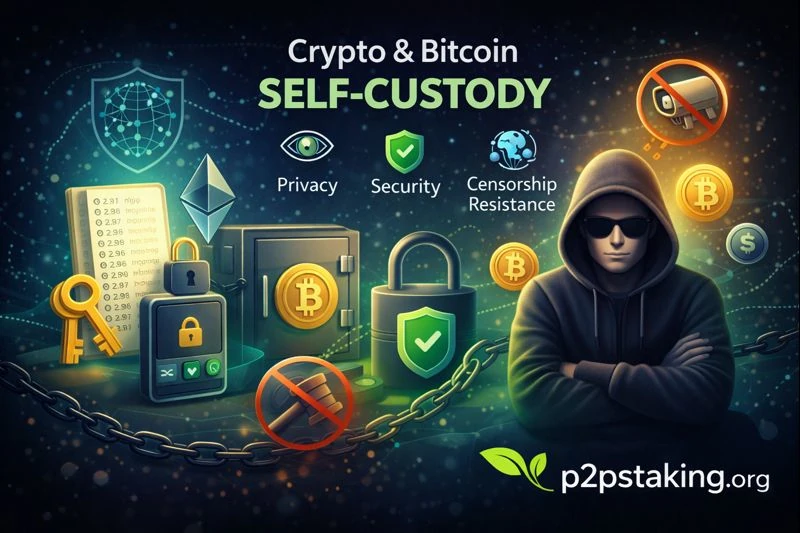
Crypto and Bitcoin self-custody means you control your private keys—and therefore your assets. Just like holding a physical wallet in your pocket, no bank, platform, or third party can freeze, seize, or move your crypto without your permission.
This self-custody course guides you step by step, from the fundamentals—why self-custody matters and how to safely send and receive cryptocurrencies—to advanced topics such as wallet security, backups, and long-term protection.
By the end of the course, you’ll fully understand the advantages of self-custody and have the confidence and skills to take complete ownership of your digital assets, including Bitcoin, Ethereum, USDC, USDT, Solana, and virtually any other cryptocurrency.
You don’t just use crypto—you truly own it.
What Is Crypto or Bitcoin Self-Custody?
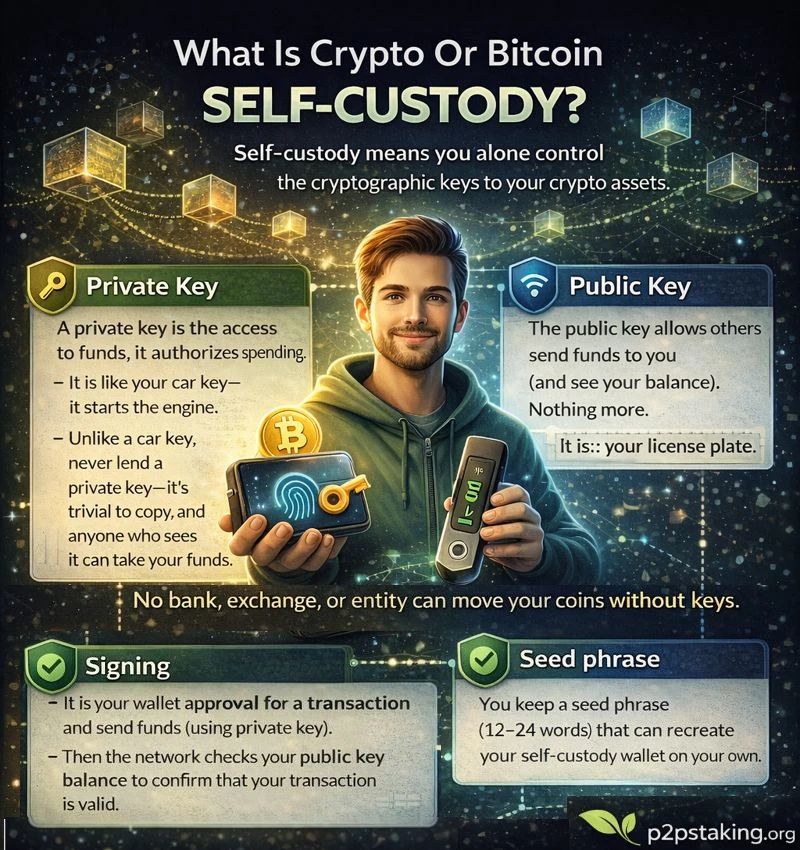
Self-custody means you alone control the cryptographic keys to your crypto assets.
You keep a seed phrase (12–24 words) that can recreate your self-custody wallet on your own.
Your device signs transactions locally; the network verifies them. Only the owner of the funds can move them, and no third party can reverse, block, or roll back a confirmed transaction.
No bank, exchange, or entity can move your coins without your keys.
Private Key
A private key is what ultimately gives you control over your funds. It is the cryptographic secret that authorizes spending from a wallet.
In practice, users do not usually manage individual private keys directly.
Instead, wallets rely on a seed phrase that can deterministically regenerate the entire wallet.
This means:
- One seed phrase can generate multiple private keys
- Each private key can control different addresses or funds
- Losing the seed phrase means losing access to all associated private keys
Think of the private key as the engine key that allows spending, while the seed phrase is the master blueprint that can recreate all keys in your wallet.
Because private keys are digital and easy to copy, they must remain secret and protected at all times.
Public key
A public key allows others to send funds to you and see transactions associated with your wallet on the blockchain.
Just like private keys, wallets typically manage multiple public keys, not just one.
In UTXO-based blockchains like Bitcoin, good wallet practices generate a new receiving address for each transaction:
- Each address corresponds to a new public key
- Each received amount becomes a separate UTXO
- This improves privacy and security
You can think of public keys and addresses like disposable mailboxes:
they can safely be shared, reused if needed, but are better rotated for privacy.
Sharing a public key is safe—it does not allow anyone to spend your funds.
Seed phrase
A seed phrase is a list of 12 to 24 words that serves as the master backup of your wallet.
From this single phrase, the wallet can regenerate:
- All private keys
- All public keys
- All addresses across supported blockchains
If your device is lost or destroyed, the seed phrase allows you to fully recover your wallet on a new device.
Anyone who has access to your seed phrase has full control over your funds.
This is why it must be kept offline, secret, and securely stored.
Signing
Signing is how you approve and authorize transactions.
When you send crypto, your wallet uses the relevant private key to sign the transaction locally on your device.
The blockchain then verifies the signature using the corresponding public key—without ever seeing your private key.
Once confirmed by the network, the transaction is final and irreversible.
How a Wallet Brings Everything Together
A wallet is the software (or hardware) that manages all of this complexity for you.
When you create a wallet:
- A new seed phrase is generated randomly, or
- An existing seed phrase is imported to restore a wallet
From that seed phrase, the wallet derives multiple private keys and public keys, allowing you to:
- Separate personal, professional, investment, or spending funds
- Improve privacy and organization
- Manage different usage contexts safely
Many modern wallets also support multiple blockchains (Bitcoin, Ethereum, Solana, etc.) from a single interface—while still giving you full control over your keys.
The wallet doesn’t own your crypto.
You do—through your keys.
Why Crypto and Bitcoin Self-Custody? (Benefits)
Self-custody of your Bitcoin, USDT, USDC, Ethereum, or any token gives you real control and unlocks important benefits.
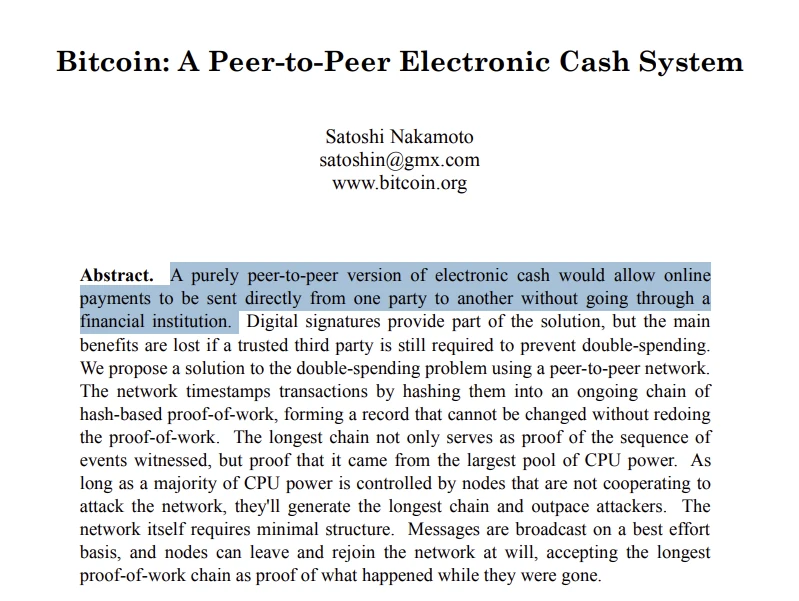
It’s also the original vision outlined by Satoshi Nakamoto: “A purely peer-to-peer version of electronic cash would allow online payments to be sent directly from one party to another without going through a financial institution.” In other words, hold your own keys, transact directly, and avoid intermediaries.
Bitcoin whitepaper1 Abstract – Satoshi Nakamoto
Full control of assets
You decide when and where funds move—no withdrawal limits, pauses, or account freezes.
You hold your tokens in your crypto sef-custody wallet. You spend on-chain without platform approvals. You access to L2/Lightning for lower fees.
Spend crypto reliably
You own the address. You can prove origin, receive refunds to the same address (or specify a new one), and sign messages if needed.
In case of a refund, the recipient can send the tokens back to your original sending address. (While sending funds back to an exchange deposit address may result in a loss).
Security
Remove centralized counterparty risk and single points of failure.
Avoid exchange-specific risks such as bankruptcy, regional shutdowns, frozen withdrawals, and sudden policy changes.
Censorship resistance and permissionless access
Transact peer-to-peer on public networks; no KYC gate to move funds on-chain.
Multiple fee paths and nodes reduce reliance on any single provider.
Self-sovereignty and financial inclusion
Hold and transfer value globally with only an internet connection.
No need for bank accounts; programmable money for individuals and communities.
Instant access to finance. No address, no paperwork.
Interoperability across chains and DeFi
Use Bitcoin, Ethereum, Solana, and stablecoins directly in wallets, dApps, and protocols.
Access staking, lending, swaps, NFTs, and payments—features ETFs/exchanges can’t provide.
Our article that explains why self-custody mattersHow Bitcoin Self-Custody Works
Bitcoin Self-custody means you, and only you, control the keys to your bitcoin. It works exactly the same for any Crypto self-custody.
Bitcoin Self-custody wallet
Choose a bitcoin wallet (software or hardware) based on security needs and usage.
- Bitcoin Software wallet: Mobile or desktop app. Best for small to medium amounts and frequent spending. Fast setup, convenient, but more exposed to online risks.
- Bitcoin Hardware wallet: Dedicated offline device. Best for larger, long-term holdings. Strong protection against malware and phishing; slightly more setup and learning.
Back up your seed phrase(s) rigorously
The seed phrase (typically 12–24 words) is the master key to your funds. Anyone with it can move your bitcoin or crypto of its associated wallet.
- Write it down offline, verify each word, and test recovery before funding.
- Use durable backups (e.g., metal plates) to resist fire/water. Avoid digital photos, cloud storage, or screenshots.
Responsibility: secure storage and an inheritance plan
- Secure storage: Keep backups in physically separate, discreet locations. Control access and audit periodically.
- Access hygiene: Use strong device PINs, keep firmware/software updated, verify addresses on the hardware screen, and practice a small test send.
- Inheritance: Define a clear, testable process for your heirs. Document where backups are, how to use them, and what expert help to contact.
- Review regularly: Rehearse recovery annually, rotate locations if needed, and update plans after life events.
Self-custody Risks and Trade-offs (Cons)
Self-custody gives you control, but it comes with responsibilities and possible downsides.
Before you start, understand these risks and how to mitigate them.
Personal responsibility
You are the “bank.” If you lose your seed (12–24 words), no one can help recover funds.
Don’t take photos or store the seed in email/cloud.
Irreversible mistakes
Crypto transfers can’t be undone. A wrong address, wrong network, or missing memo = money gone (on network that require a memo, Bitcoin, Ethereum do not).
Approving a bad app/website can drain your wallet.
Learning curve
You’ll learn basics like seed phrase, fees, and confirmations.
You can face more complicated situations that require a better understanding. Be safe and start with some amount transactions.
Device and purchase risks
Viruses and fake apps can steal funds; always download from official sources.
Counterfeit or tampered hardware wallets are dangerous—buy direct from the manufacturer.
Compare Self-Custody vs Exchange Account vs ETF
Here’s a quick side-by-side of self-custody, exchange accounts, and ETFs—covering control, security, censorship risk, costs, and real on-chain access.
While self-custody is clearly advantageous across most dimensions—sovereignty, censorship resistance, counterparty risk, and on-chain access—it also comes with critical responsibilities.
The few areas marked as caution are not minor trade-offs: they directly determine the long-term safety and recoverability of funds.
| Category | Self-Custody | Exchange Account | Crypto ETF |
|---|---|---|---|
| Control of keys | ✅ You hold the keys | ❌ Custodian holds keys | ❌ Fund custodian holds keys |
| Security model | ⚠️ Personal wallet + seed backup (human error risk) | ⚠️ Platform security; single point of failure | ✅ Regulated custodian, but centralized control |
| Censorship resistance | ✅ High (peer-to-peer) | ❌ Low–Medium (account freezes possible) | ❌ Low (brokerage/fund rules) |
| Counterparty risk | ✅ Minimal (protocol risk only) | ❌ High (exchange / insolvency risk) | ⚠️ Medium (fund + custodian risk) |
| Privacy | ✅ Potentially higher ⚠️depends on practices | ❌ Low (KYC + on-chain clustering) | ❌ Low (brokerage + fund records) |
| Fees / costs | ➖ One-time hardware + network fees | ❌ Trading fees, spreads, withdrawals | ❌ Management fee + trading spread |
| Access to DeFi / staking / spending | ✅ Full on-chain access | ⚠️ Limited; often blocked | ❌ None (price exposure only) |
| Recovery / inheritance options | ⚠️ Your responsibility (backups, multisig, legal) | ⚠️ Exchange policies; support-dependent | ✅ Standard brokerage estate process |
| Jurisdictional exposure | ✅ Lower; self-managed, cross-border | ❌ High; exchange jurisdiction | ❌ High; fund + brokerage jurisdictions |
If self-custody fits your needs, let’s move on to how to do it.
Starting with choosing a software or hardware wallet and setting up securely.
Software Wallets (Hot Wallets)
Software wallets are apps on your phone or computer that store and use your private keys to sign transactions.
They stay connected to the internet (hot), making them convenient for everyday use, dApps, and quick transfers, but they rely on your device’s security and are best for smaller balances.
Key features
- Mobile and/or desktop clients with clear UX
- Hardware-signer integration (always good to have, but adding a hardware wallet to
- Custom fees to optimize transaction costs
- Tor support for better privacy
- Address labeling
Best practices
- Open-source wallets with independent audits and active maintenance
- Official downloads; avoid fake apps and unknown origin
- Encrypt wallet, enable device PIN/biometrics, and keep secure, offline seed backups
- Use separate wallets/personas for different activities
Software wallets are great for learning the tech and handling moderate amounts with speed and convenience.
You can visit our software wallet guide to get started with step-by-step tutorials.
However, you must avoid storing significant funds on a hot wallet; use a hardware wallet for long-term, higher-security storage.
Hardware Wallets (Cold Wallets)
Hardware wallets are dedicated, offline devices that generate and store your private keys inside a secure chip.
They sign transactions on-device, so your keys never touch an internet-connected phone or laptop. This protects you if your computer/phone gets malware or is lost—an attacker still can’t spend without the hardware device (and PIN/passphrase).
Key features
- Secure element or verifiable secure firmware
- Air-gapped or QR-based signing; USB/NFC with strict confirmation on-device
- Clear-screen address verification; anti-tamper design
- Passphrase or multisig support
Best practices
- Buy directly from the manufacturer; inspect packaging and device authenticity
- Initialize and generate the seed offline; never accept pre-printed seeds
- Keep firmware updated from official sources; verify checksums/signatures
- Store seed/passphrase separately, with geodispersed backups
- Test recovery while you hold low amount
Visit our hardware wallet pages for a hardware wallet documentations.
Self-custody Security Essentials
Seed phrase security
Your seed phrase is the only way to recover your funds if your wallet is lost, broken, or wiped.
It is not a password that can be reset. There is no “forgot seed phrase” button in crypto.
Anyone who gets access to your seed phrase can fully control your funds, from anywhere in the world, without your permission.
That’s why securing your seed phrase is the most important responsibility in self-custody.
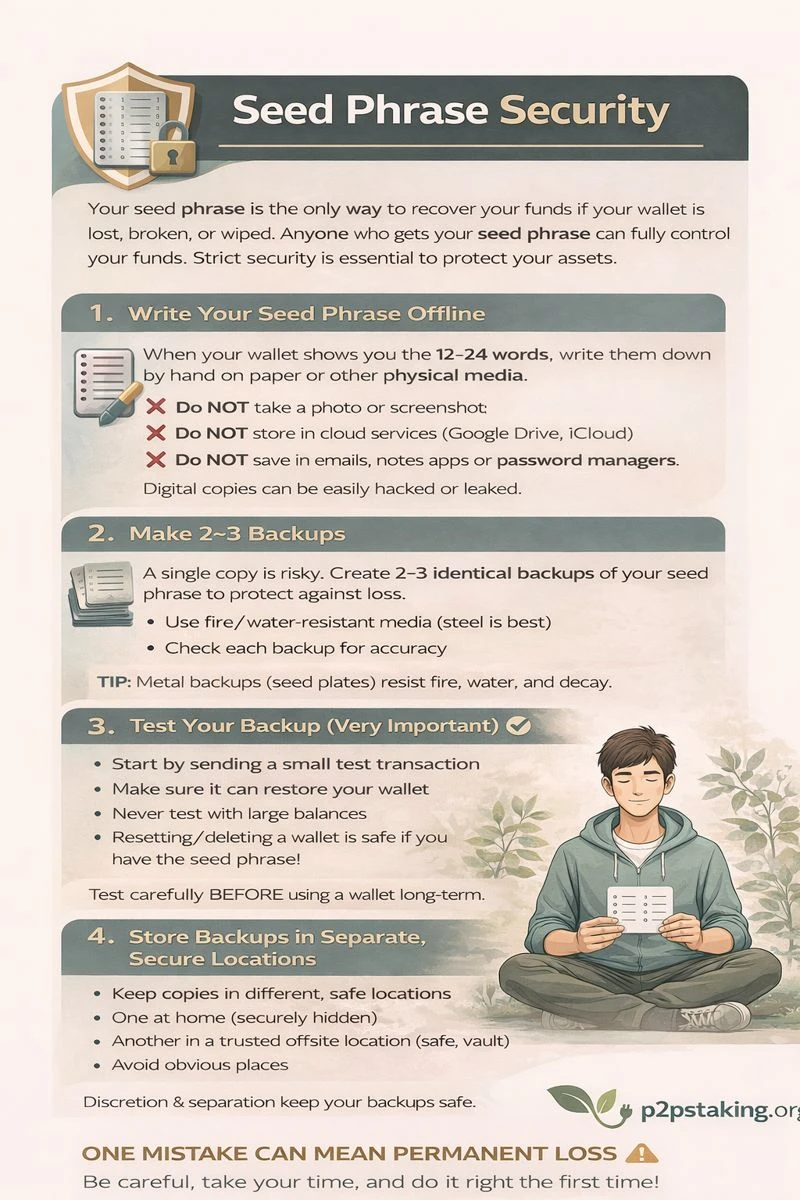
1. Write your seed phrase offline
When your wallet shows you the 12–24 words, write them down by hand on a physical medium.
- Do not take a photo or screenshot
- Do not store it in cloud services (Google Drive, iCloud, Dropbox)
- Do not save it in emails, notes apps, or password managers
Digital copies are easy to leak through malware, hacks, or account compromises.
Offline storage removes entire classes of attack.
2. Make 2–3 backups
Having only one copy is risky.
- A fire, flood, or accident could destroy it
- Ink on paper can fade over time
Create two or three identical backups to reduce single-point-of-failure risk.
For long-term storage, prefer fire- and water-resistant media:
- Metal seed plates or steel backups are strongly recommended
- Paper is acceptable for beginners but less durable
Each backup should be checked for accuracy before being stored.
3. Test Your Backup (Very Important)
Before trusting your seed phrase for long-term storage, you should test that it actually works.
This means checking that your seed phrase can really restore your wallet and give you access to your funds.
Start with small amounts
When testing a backup for the first time, always use a very small amount of funds.
- Send a small test transaction to your wallet
- Assume that mistakes are possible at the beginning
- Never test a backup for the first time with a large balance
This way, if something goes wrong, the risk is minimal.
Testing builds confidence
Testing your backup is about peace of mind. A successful test confirms that your seed phrase was written correctly, that you understand how wallet recovery works, and that you are not relying on assumptions or memory.
Once your backup has been tested, you can confidently store it for the long term and gradually increase the amount of funds you secure with that wallet.
Resetting a wallet is safe
Resetting or deleting a wallet does not delete your funds, because your funds live on the blockchain, not on the device itself.
As long as you have your seed phrase, you can always restore your wallet, whether it is a software wallet that was deleted or a hardware wallet that was reset. Devices and apps are replaceable. The seed phrase is not.
Understanding this is essential for beginners and helps remove much of the fear around testing backups and making mistakes.
4. Store backups in separate, secure locations
Never keep all backups in the same place.
Good practice:
- One backup at home
- One in a secure off-site location (safe, vault, trusted place)
This protects you against:
- Theft
- Natural disasters
- Accidental loss
Avoid obvious locations (desk drawers, labelled envelopes).
Security comes from discretion and separation.
5. Restrict who knows your seed phrase exists
Your seed phrase should be known by as few people as possible—ideally only you.
- Never share it with support, exchanges, or “wallet helpers”
- No legitimate service will ever ask for it
- Be cautious even with close contacts
Even knowing that a seed phrase exists can make you a target.
Silence is part of security.
Optional for Advanced users: Passphrase (25th word)
Some wallets allow you to add an optional passphrase on top of your seed phrase. This passphrase acts like an extra secret that is required in addition to the 12–24 words.
With a passphrase enabled, the seed phrase alone is not enough to access the wallet. Without the correct passphrase, the wallet will appear empty, even if the seed phrase is correct.
This mechanism allows the same seed phrase to generate multiple, completely separate wallets, sometimes called “hidden” or “passphrase-protected” wallets. Each different passphrase creates a different wallet, even though the seed phrase stays the same.
This feature can greatly improve security, but it comes with a serious trade-off. If you forget or lose the passphrase, there is no way to recover it. The funds protected by that passphrase are lost permanently.
Because of this risk, using a passphrase is powerful but should only be considered once you fully understand how wallet recovery works and are confident in your backup and security practices.
Inheritance
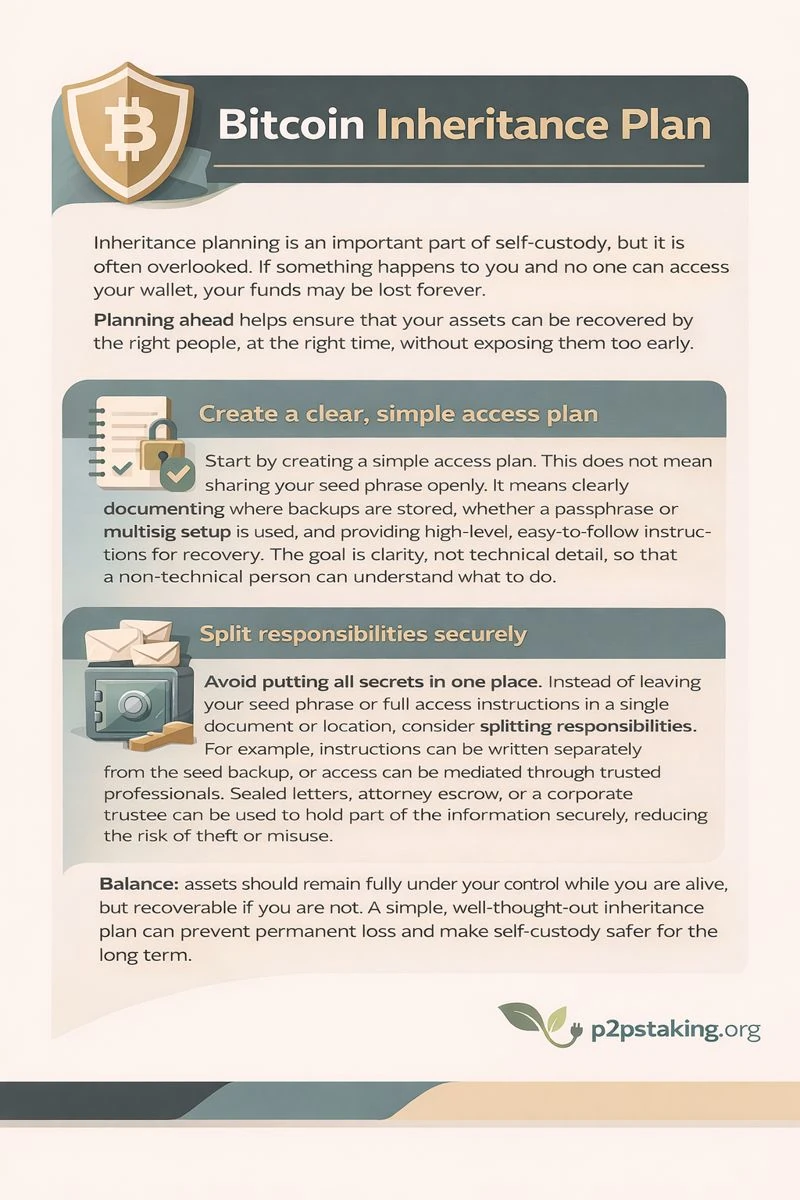
Inheritance planning is an important part of self-custody, but it is often overlooked. If something happens to you and no one can access your wallet, your funds may be lost forever. Planning ahead helps ensure that your assets can be recovered by the right people, at the right time, without exposing them too early.
Start by creating a simple access plan. This does not mean sharing your seed phrase openly. It means clearly documenting where backups are stored, whether a passphrase or multisig setup is used, and providing high-level, easy-to-follow instructions for recovery. The goal is clarity, not technical detail, so that a non-technical person can understand what to do.
Avoid putting all secrets in one place. Instead of leaving your seed phrase or full access instructions in a single document or location, consider splitting responsibilities. For example, instructions can be written separately from the seed backup, or access can be mediated through trusted professionals. Sealed letters, attorney escrow, or a corporate trustee can be used to hold part of the information securely, reducing the risk of theft or misuse.
The key idea is balance: assets should remain fully under your control while you are alive, but recoverable if you are not. A simple, well-thought-out inheritance plan can prevent permanent loss and make self-custody safer for the long term.
Best practices
Phishing defence
- Type URLs yourself; verify app publishers; beware lookalike domains.
- Never enter seed/passphrase into a website or chat—only into your wallet during offline recovery.
- Beware “support” agents and airdrop scams; verify announcements from official channels.
Transaction verification
- Always confirm the receiving address on the hardware screen.
- For smart contracts, use transaction simulation and human-readable prompts.
- Send a small test first when paying a new address or large amount.
Threat modeling (by asset size and usage)
- Small balances: software wallet + device PIN/biometric; frequent updates.
- Medium: hardware wallet, passphrase, test-sends, dedicated PC profile.
- Large/long-term: multisig (2-of-3 or 3-of-5), geodispersed keys, vendor diversity, strict procedures.
Firmware/app hygiene
- Update firmware and wallet apps from official sources; verify signatures/checksums.
- Remove unused browser extensions; lock down permissions.
- Use a clean, dedicated user profile or device for crypto operations.
[Advanced user] Shamir/multisig
- Shamir (SLIP-0039): split a seed into shares (e.g., 2-of-3). Good for backup resilience.
- Multisig: multiple keys must co-sign (e.g., 2-of-3). Strong for high-value storage; keep keys on different devices/locations/vendors.
Crypto Self‑Custody Checklist (free PDF)
Ready to begin your self‑custody journey?
Our Crypto Self‑Custody Checklist walks you through the essential actions for software and hardware wallets so you don’t miss any critical step.
It is a downloadable PDF that walks you through the essential actions for software and hardware wallets and includes pre‑printed tables where you can neatly write down your recovery seed.
Checklist: Self-Custody Security (10 Points)
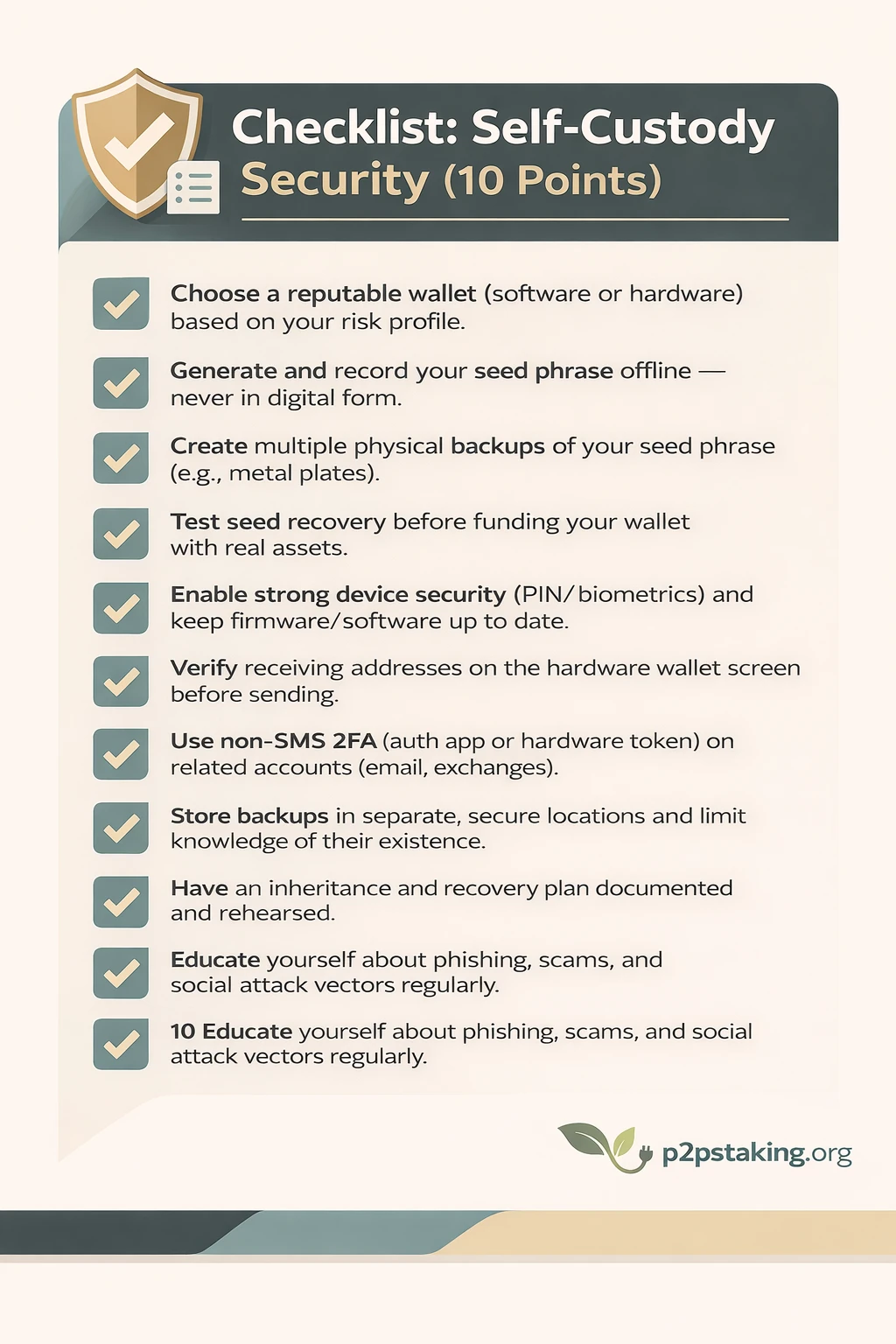
- Choose a reputable wallet (software or hardware) based on your risk profile.
- Generate and record your seed phrase offline — never in digital form.
- Create multiple physical backups of your seed phrase (e.g., metal plates).
- Test seed recovery before funding your wallet with real assets.
- Enable strong device security (PIN/biometrics) and keep firmware/software up to date.
- Verify receiving addresses on the hardware wallet screen before sending.
- Use non-SMS 2FA (auth app or hardware token) on related accounts (email, exchanges).
- Store backups in separate, secure locations and limit knowledge of their existence.
- Have an inheritance and recovery plan documented and rehearsed.
- Educate yourself about phishing, scams, and social attack vectors regularly.
Risks + Mitigations
| Risk | Impact | Mitigation |
|---|---|---|
| Phishing | Loss of keys / funds | Verify URLs & app publishers; never paste seed into websites. |
| Seed phrase compromise | Permanent fund loss | Offline backup only; multiple physical copies; no photos/cloud. |
| SIM Swap | Account takeover via SMS | Use app-based 2FA & secure SIM account with carrier protections. |
| Malware / Keylogger | Theft of credentials | Use hardware wallets & clean devices; update security software. |
| Device loss or theft | Access loss | Offline backups; PIN/biometric locks; encrypted device storage. |
Improve Privacy with Bitcoin Self-Custody
Self-custody improves privacy because you remove the custodian that collects KYC data, logs withdrawals, and links your identity to specific on-chain addresses.
Managing your own wallets lets you control address reuse, network connections (own node/Tor), and spending patterns—reducing metadata leaks that exchanges and custodial services typically create and share.
Address reuse and coin control
Avoid reusing addresses; generate a new one per payment.
- How it’s meant to work: Wallets can create virtually unlimited fresh addresses from your seed. Give a new receive address each time; funds still arrive in the same wallet.
- Advantages:
- Reduces linkage between payments, making it harder to map your total balance.
- Limits exposure of your transaction history to payers.
- Improves negotiation/privacy in commerce (each invoice has its own address).
- Lowers risk if one address is leaked or monitored.
- You can use coin control to choose which UTXOs you spend; keep “clean” and “tainted” funds separate.
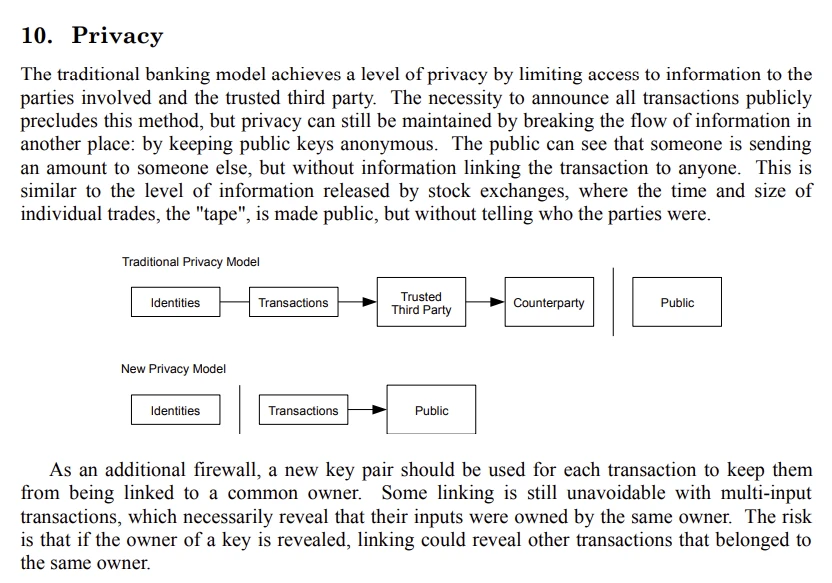
Bitcoin whitepaper on privacy – Satoshi Nakamoto
Advanced: Run a bitcoin node
Prefer your own node or trusted privacy-friendly RPC
- Running your own node prevents leaking your IP and full address list to third-party providers. It strengthens Bitcoin’s decentralization and protects your privacy—a win-win.
- Trade-offs: you’ll need a device with around 1 TB of storage, kept online 24/7, plus light upkeep (updates, occasional troubleshooting).
General Crypto self-custody Privacy
If you’re not ready for that, here are practices that improve privacy across all chains:
On-chain metadata and heuristics
- Blockchains are public; analysts cluster addresses via change detection, timing, and amount patterns.
- Limit linkages: vary amounts, avoid combining unrelated funds in one spend, and beware cross-chain bridges revealing links.
Wallet labeling and privacy tools
- Label addresses/UTXOs in your wallet to track provenance.
- Use PayJoin/Stonewall and, where legal and appropriate, coinjoin tools to break common-input ownership heuristics.
- For EVM, periodically rotate addresses; revoke token approvals you no longer need.
Network privacy
- Route via Tor/VPN where appropriate
- Disable telemetry/analytics in wallets when possible
Minimizing KYC linkages
- Withdraw from exchanges to fresh addresses; avoid mixing KYC and non-KYC funds.
- Consider peer-to-peer transfers for privacy, respecting local laws.
Censorship Resistance
How self-custody reduces intermediaries
- You hold keys and send native on-chain transactions—no exchange approvals, card processors, or custodians to block or delay transfers.
- Funds move peer-to-peer via the network’s. So consensus rules apply, not platform policies.
Network fees, mempool, and miners/validators
Using a self-custodial wallet is the natural way to use the network.
Transactions first go to a public waiting area (the mempool). Miners or validators then include them in blocks based on your fee and the protocol’s rules. When the network is busy, fees rise, but you still don’t need anyone’s permission to send.
Even if some miners/validators filter under local policies, the wider network typically includes any valid transaction with a sufficient fee.
Mitigations
- Use multiple providers: keep several RPC endpoints/explorers and fee estimators.
- Run your own node to broadcast directly and avoid provider-level blocking.
- Use L2s and alternative rails (e.g., Lightning, rollups) to route around congestion and single points of failure.
Spend crypto with a self-custodian wallet
Using a self-custody wallet to spend crypto means you are the one authorizing every payment. There is no intermediary approving or blocking transactions. This gives you freedom, but it also means you must follow good practices to avoid mistakes.
Paying from a Self-Custody Wallet
When sending crypto from your own wallet—whether to friends, family, or an exchange—you should always start carefully.
If you are sending to a new recipient or address for the first time, begin with a very small test amount. Wait for it to arrive and confirm it was received correctly before sending the full amount. This simple habit greatly reduces the risk of loss and helps you build confidence with each new payee.
Once a transaction is sent and confirmed on the blockchain, it cannot be reversed, so taking a few extra minutes to double-check is always worth it.
Paying on a Website or to a Merchant
When paying on a website or to a merchant, you will usually be given:
- A payment address, or
- A payment invoice (often with an amount and address already filled in)
Always copy and paste the address and the exact amount provided. Never type crypto addresses by hand—one small typo can send funds to the wrong place permanently.
Before confirming the transaction, verify the destination address on your wallet’s device or screen, especially if you are using a hardware wallet. This protects you from clipboard malware or tampered payment pages.
One advantage of paying from your own wallet is that refunds are simpler and more transparent. A merchant can return funds directly to the same sending address, or to a new address you provide. In some cases, you can also sign a message to prove you control the wallet that made the payment.
Fees Management and Confirmation Speed
Transaction fees depend on the blockchain you are using and how busy the network is.
On Bitcoin, fees matter more and can vary significantly. It is useful to check current network conditions using tools like mempool.space. Many wallets allow you to enable Replace-By-Fee (RBF), which lets you increase the fee later if a transaction is stuck.
On Ethereum, fees are generally easier to manage. Most wallets provide safe default settings based on current conditions. You typically set a maximum fee and a small priority tip. Avoid peak network times if possible, as fees can rise quickly.
On many other blockchains, such as Solana or Layer-2 networks, fees are usually very low. In most cases, standard wallet settings are enough for fast confirmation without any manual adjustment.
When choosing fees, decide based on urgency:
- If the transaction is not urgent, you can choose a lower fee and allow it to confirm later.
- If you need fast confirmation (time-sensitive payments, trading, or mints), select a higher or “fast” fee.
Conclusion
Self-custody is not about perfection—it’s about progress. You don’t need to master everything on day one to start benefiting from it.
The best way to begin is to start with small amounts. Use them to practice creating a wallet, backing up your seed phrase, sending and receiving funds, adjusting fees, and recovering from a backup. These small, low-risk steps help you become comfortable with the technology and build real confidence.
As you gain experience, your habits improve: you double-check addresses, test transactions, manage fees calmly, and understand how wallets, keys, and backups really work. Over time, what once felt complex becomes routine.
Self-custody gives you something rare in the digital world: true ownership. No intermediaries, no permission, no reliance on third parties—just you and the network.
Start small, move carefully, learn by doing, and scale up when you’re ready.
That’s how you turn crypto from something you use into something you truly own.
Ready to Take Control of Your Crypto?
Go deeper into self‑custody, software wallets, hardware wallets, and practical guides.

As a long‑time BTC HODLer who actually spends crypto (both IRL and online) and tests flows end‑to‑end, I document what works, fees, and pitfalls. Expect practical, reproducible steps and risk notes from real experiences.
FAQ — Crypto & Bitcoin Self-Custody
How to self-custody Bitcoin?
To self-custody Bitcoin, you must use a wallet where you control the private keys.
The process is:
1. Choose a self-custody wallet (software or hardware)
2. Generate a wallet and securely write down the seed phrase (12–24 words)
3. Test wallet recovery with a small amount
4. Send Bitcoin to an address generated by your wallet
5. Store your seed phrase offline and securely
Once set up, only you can move your Bitcoin.
What is Bitcoin self-custody?
Bitcoin self-custody means you personally control the cryptographic keys that secure your Bitcoin.
No exchange, bank, custodian, or ETF provider holds your keys.
You sign transactions yourself, and no third party can freeze, block, or reverse them.
In short: if you hold the keys, you own the Bitcoin.
Is Bitcoin self-custody safe?
Bitcoin self-custody is safe when best practices are followed.
It removes risks related to exchanges, such as hacks, insolvency, frozen withdrawals, or policy changes.
However, it introduces personal responsibility.
The main risks are:
– Losing the seed phrase
– Falling for phishing or scams
– Making irreversible transaction mistakes
With offline backups, test transactions, and proper wallet usage, self-custody is highly secure.
What happens if I lose my wallet or device?
Losing a wallet device does not mean losing your Bitcoin.
Your funds are stored on the blockchain.
As long as you still have your seed phrase, you can restore your wallet on a new device and recover full access.
If both the device and the seed phrase are lost, the funds are permanently inaccessible.
What is a seed phrase?
A seed phrase is a list of 12 to 24 words that acts as the master backup of a crypto wallet.
From the seed phrase, the wallet can regenerate:
All private keys
All public keys
All wallet addresses
Anyone with the seed phrase can fully control the funds.
This is why it must be stored offline and kept secret.
Should beginners use a software wallet or a hardware wallet?
Beginners can start with a software wallet for small amounts and learning purposes.
A hardware wallet is recommended for:
– Larger balances
– Long-term storage
– Higher security needs
Many users begin with a software wallet and later move to a hardware wallet as their holdings grow.
Can I self-custody cryptocurrencies other than Bitcoin?
Yes.
Self-custody works for many cryptocurrencies, including:
– Ethereum
– USDT, USDC (and most stablecoins)
– Solana
Other tokens and blockchains
The principle is always the same: you control the keys, sign transactions locally, and manage your own backups.
Is Bitcoin self-custody legal?
In most countries, Bitcoin self-custody is legal.
Holding your own crypto is similar to holding cash or gold.
However, buying, selling, and spending crypto may still be subject to tax and reporting requirements depending on your jurisdiction.
Always verify local regulations.
Can I send Bitcoin from a self-custody wallet to an exchange?
Yes.
You can send Bitcoin from your self-custody wallet to an exchange deposit address at any time.
Best practices include:
– Double-checking the deposit address
– Sending a small test transaction first
– Using the correct network
Is Bitcoin self-custody difficult to learn?
Bitcoin self-custody has a learning curve, but it is accessible to beginners.
Starting with small amounts allows users to:
– Learn how wallets work
– Practice backups and recovery
– Gain confidence without major risk
With experience, self-custody becomes routine.
What is the biggest mistake beginners make with self-custody?
The most common beginner mistakes are:
– Not backing up the seed phrase properly
– Storing the seed phrase digitally (photos, cloud, email)
– Skipping test transactions
– Falling for fake support or phishing scams
Most losses are preventable through education and careful setup.
Why is self-custody important?
Self-custody gives you:
– Full control over your assets
– Protection from custodial failures
– Censorship resistance
– Direct access to on-chain payments, DeFi, and protocols
It is the original design of Bitcoin and the foundation of true digital ownership.