Centralized exchanges provide convenient access to crypto markets, but they operate under a custodial model. This means users rely on the exchange’s infrastructure, internal controls, and compliance processes.
While exchanges invest heavily in security, most account compromises are caused by avoidable user-side weaknesses, not platform failures. This guide explains how to configure an exchange account more safely, using practical measures applicable to most major centralized exchanges.
Key takeaways
Before going into detailed settings, three actions account for most of the security gains when using a centralized exchange:
- Install and use an app-based (or hardware-based) 2FA method
Authentication apps significantly reduce the risk of phishing and SIM-swap attacks compared to SMS-based methods. - Secure — or replace — the email address linked to the exchange
Email is often the weakest link. If an email address has been reused or exposed in past data breaches, creating a new, dedicated email for crypto activity is often safer. - Avoid keeping significant or long-term holdings on exchanges
Exchanges are access points, not vaults. Long-term or significant holdings are generally better secured in self-custody solutions such as hardware wallets, once users are ready.
Who this is for
Beginners and active users who keep funds on an exchange and want a practical crypto Exchange Security Setup checklist.
This checklist is designed for users who actively use centralized exchanges and keep part of their funds on them. It focuses on concrete, actionable security steps to reduce everyday risks.
If you are instead looking for a broader, high-level overview of how exchanges work, their custody models, and the trade-offs between custodial and non-custodial solutions, you can consult our Custodial Guide.
Exchange Security Setup: what it means?
Exchange Security Setup is the process of configuring login protection, withdrawal controls, and alerts so attackers can’t easily take over your account or withdraw funds. This guide focuses on the highest-impact settings that exist on most major platforms.
Exchange Security Setup checklist (quick version)
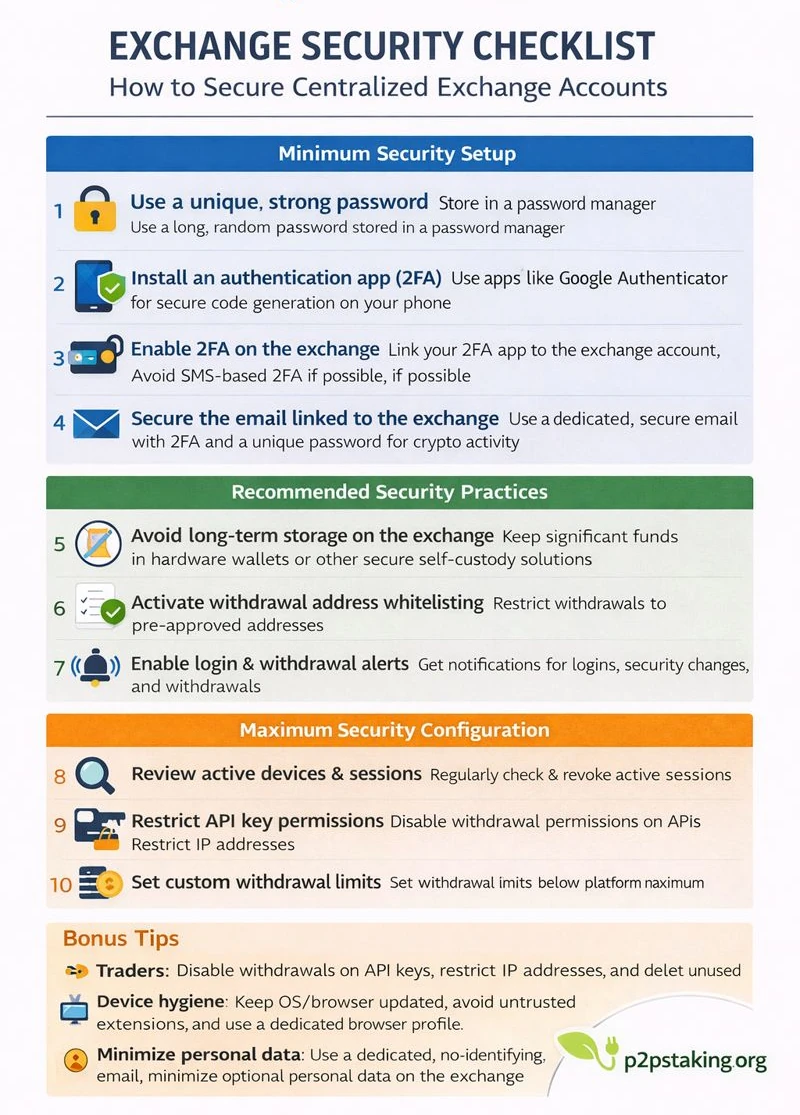
- Use a unique, strong password
Create a long, randomly generated password and store it in a password manager. Never reuse it on another service. - Install an authentication app (2FA)
Install an app-based authenticator on your phone to generate secure, offline verification codes. - Enable 2FA on the exchange
Link your authentication app to the exchange account and avoid SMS-based 2FA whenever possible. - Secure the email linked to the exchange
Use a dedicated email address with a strong password and app-based 2FA. Create a new email if existing ones are already compromised or widely reused. - Avoid long-term storage on the exchange
Keep only what you actively use on the exchange and move long-term or significant holdings to self-custody solutions. - Activate withdrawal address whitelisting
Restrict withdrawals to pre-approved addresses to prevent unauthorized fund transfers. - Enable login and withdrawal alerts
Receive notifications for new logins, security changes, and withdrawal requests to detect issues early. - Review active devices and sessions
Regularly check logged-in devices and revoke access you do not recognize. - Restrict API key permissions
Disable withdrawals on API keys, restrict IP addresses when possible, and delete unused keys. - Set withdrawal limits
Set custom withdrawal limits below the platform maximum to reduce potential losses in case of compromise.
Minimum Security Setup
These steps should be completed before depositing meaningful funds on any exchange.
1. Use a unique, strong password
A unique password prevents attackers from using credentials leaked from other services to access your exchange account.
In practice:
- Use a long, randomly generated password
- Never reuse it on any other service
- Store it in a reputable password manager
Password reuse remains one of the most common causes of exchange account takeovers.
2. Install an authentication app (2FA)
Before enabling two-factor authentication on an exchange, you need a reliable authentication method on your device.
Why this matters:
- App-based 2FA generates codes locally on your device
- Codes are not transmitted over the phone network
- Attackers cannot intercept them remotely in the same way as SMS codes
In practice:
- Install a well-known authentication app on your phone
- Secure your phone with a strong unlock method (PIN, biometrics)
- Avoid using rooted or heavily modified devices
This step prepares your device before linking it to your exchange account.
3. Enable two-factor authentication (2FA) on the exchange
Once an authentication app is installed, enable 2FA in your exchange account settings.
Most exchanges support multiple options:
- App-based 2FA (recommended)
Requires access to your physical device to generate codes, making phishing and SIM-swap attacks far less effective. - SMS-based 2FA (less secure)
Relies on your phone number and the mobile network, which can be compromised through SIM-swap or number-porting attacks.
For these reasons, app-based 2FA should always be preferred when available, and SMS-based 2FA should be avoided if possible.
4. Secure the email account linked to the exchange
Your email account is used for password resets, withdrawal confirmations, and security alerts. If it is compromised, exchange-level protections can often be bypassed.
Best practices:
- Use a dedicated email address for crypto activity
- Enable a strong, unique password and app-based 2FA on that email
- Avoid reusing an email address that has appeared in past data breaches
If your existing email has already been widely reused or exposed, creating a new email specifically for exchange use is often safer than attempting to secure an already compromised address.
Recommended Security Practices
These steps further reduce risk once the account is active.
5. Avoid long-term passive storage on the exchange
Centralized exchanges are designed for trading and access, not long-term custody.
Why this matters:
- Funds remain exposed to custodial and regulatory risk: As long as funds stay on an exchange, users depend on the platform’s solvency, internal controls, and regulatory obligations, which they do not fully control.
- Accounts can be frozen during compliance reviews: Exchanges may temporarily restrict accounts during KYC, AML, or regulatory checks, even when no wrongdoing is involved.
- Idle funds increase exposure without adding utility: Keeping funds inactive on an exchange increases risk without providing any operational benefit, since the assets are not being actively used.
In practice:
- Keep only what you actively use on the exchange
- Move long-term holdings to self-custody solutions when appropriate
6. Activate withdrawal address whitelisting
Withdrawal whitelisting restricts withdrawals to pre-approved addresses only.
Why this is effective:
- Prevents attackers from redirecting funds: Whitelisting ensures withdrawals can only go to pre-approved addresses, making it much harder for an attacker to move funds elsewhere.
- Changes usually require a security delay, creating time to react: Most exchanges impose a cooldown period before new withdrawal addresses become active, giving users time to notice and stop suspicious changes.
In practice:
- Add addresses you control
- Keep whitelisting enabled by default
7. Enable login and withdrawal alerts
Security alerts notify you of important account events.
Why they matter:
- Provide early warning of suspicious activity: Most exchanges impose a cooldown period before new withdrawal addresses become active, giving users time to notice and stop suspicious changes.
- Reduce the time between compromise and detection: The sooner suspicious activity is detected, the more likely it is that damage can be limited or prevented.
Enable alerts for:
- New device or location logins
- Security setting changes
- Withdrawal requests
What to do if an unexpected alert appears
If you receive an alert for an action you did not initiate, do not ignore it. Unexpected login, security, or withdrawal notifications are often the first visible signal of a potential compromise.
In practice:
- Log in immediately from a trusted device
- Change your account password
- Review and revoke active sessions and devices
- Check recent account activity and withdrawals
- Contact exchange support if anything appears unclear
Acting quickly can often stop an incident before funds are affected and limits the impact of unauthorized access.
Maximum Security Configuration
These measures are most relevant for advanced users or higher-exposure accounts.
8. Review active devices and sessions regularly
Most exchanges allow users to view active sessions and authorized devices.
Why this helps:
- Detects unauthorized or forgotten access
- Allows proactive session revocation
Review and clean up sessions periodically.
9. Restrict API key permissions
API keys allow automated access and introduce additional risk.
Best practices:
- Disable withdrawals on all API keys
- Restrict IP addresses where possible
- Delete unused keys regularly
If you do not actively use APIs, it is safer not to enable them.
10. Set withdrawal limits
Custom withdrawal limits reduce potential losses in case of compromise.
Why this helps:
- Limits maximum damage
- Provides a time buffer to detect and respond to incidents
This is especially useful for frequently accessed accounts.
Bonus: Additional Risk Reduction Practices
Bonus 1: API Keys (Traders Only)
Treat API access as highly sensitive:
- Never enable withdrawals
- Restrict IP access
- Regularly audit active keys
Bonus 2: Device Hygiene
Your account security depends heavily on your device.
Good practices:
- Keep OS and browser updated: Updates often patch known security vulnerabilities that attackers actively exploit on outdated systems.
- Avoid unnecessary or untrusted extensions: Browser extensions can access sensitive data or inject malicious code, making them a common attack vector.
- Never install cracked software: Cracked or pirated software frequently contains hidden malware that can compromise devices and steal credentials.
- Use a dedicated browser profile or device for crypto: Separating crypto activity from everyday browsing reduces exposure to malicious websites, extensions, and accidental data leaks.
Bonus 3: Minimize Personal Data Exposure
Why this matters
Personal data enables targeted phishing, social engineering, SIM-swaps, and even physical risk if identity and location are linked to crypto holdings.
Practical rules
- Complete KYC truthfully when required — but stop there
- Avoid optional profile fields (address, employer, social links)
- Use a dedicated crypto email
- Prefer app- or hardware-based 2FA
- Keep usernames and display names non-identifying
Simple rule of thumb
If a field is optional, assume it could eventually leak.
Ask:
“Would this help someone impersonate me or locate me?”
If yes, do not provide it.
Practical Approach: Start Small
Before depositing larger amounts:
- Test deposits and withdrawals with small sums
- Verify account limits and verification status
- Observe support responsiveness
This helps surface issues early.
Crypto Exchange security setup summary
The first and most important point to keep in mind is that most risks associated with centralized exchanges are avoidable. Account compromises are rarely caused by sophisticated attacks against exchange infrastructure; they are far more often the result of weak authentication, poor email security, or excessive exposure of funds.
By following the steps outlined in this guide, users can eliminate a large portion of the most common and preventable risks when interacting with centralized exchanges.
That said, even a well-secured exchange account remains subject to custodial and regulatory constraints that users do not fully control. If your objective is to reduce these risks further—especially for long-term or significant holdings—the most effective step is to limit reliance on exchanges altogether.
For assets that do not need to remain on an exchange, self-custody offers a different security model, where users hold their own keys and remove counterparty exposure.
To understand when and how to move toward this model, see our guide on self-custody: Self-Custody Guide
Ready to Take Control of Your Crypto?
Go deeper into self‑custody, software wallets, hardware wallets, and practical guides.

Java‑certified engineer and P2PStaking CEO, I secure validators across Solana, Polkadot, Kusama, Mina, and Near. My articles reflect hands‑on wallet ops and real recovery drills so you can set up self‑custody safely, step by step.
FAQ — Exchange Security Setup
Is SMS 2FA acceptable for a crypto Exchange Security Setup?
Not recommended. SIM swaps and number porting attacks are common. Use an authenticator app or hardware key.
Are withdrawal allowlists worth it?
Yes. They’re one of the most effective protections against fast theft after account takeover.
Should I do a test withdrawal every time?
For new addresses or new networks: yes. For known addresses with allowlists: still recommended when amounts are large.
Can an exchange reverse a stolen withdrawal?
Usually no. Assume withdrawals are final.
Is Exchange Security Setup safer than self-custody?
A solid crypto Exchange Security Setup uses strong 2FA, anti-phishing checks, and withdrawal allowlists to reduce account takeover and unauthorized withdrawals, but it can’t eliminate custodial platform risk.